What size computer power supply do I need?
What options in computer power supplies can save on energy, heat output and money?
Over $100 per computer can be saved per year with simple computer choices.
Computer Power Consumption Calculator Instructions
Fill in the values for your computer components in the first table.
Press the Get Results button
See the computer power consumption and options in the second table.
Suggestions to lower your computer power consumption can include:
- Select the best 80 Plus standard power supply possible.
- Measure exact computer power consumption with a power meter.
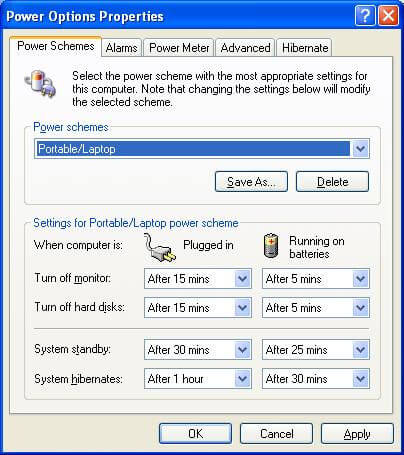
- Turning on Computer Power Management.
- Enabling S3 sleep mode in BIOS.
- Note the measured savings made with the configuration changes.

See how the calculator shows that efficiency choices can make a difference
Computer Power Management CPM defined
CPM is a way to save energy consumption of a computer using only configuration changes. Suggestions for energy saving settings are:
- Turn off screens after 15 minutes of inactivity. This is configured in the operating system to operate automatically.
- Turn off hard drives after 15 minutes of inactivity This is configured by the operating system automatically.
- Make computer go to sleep or hibernation after 30 minutes of inactivity.
- Enable in the computer BIOS: ACPI, S3 Sleep Mode, Intel Speedstep / AMD Cool n Quiet
Up to an extra 38% in electrical consumption and running costs can be saved with the above settings.
80 Plus Power Supply Consumption Details
| Specification Level | Efficiency at 50% load | Minimum Power Factor |
|---|---|---|
| 80 PLUS Bronze level | 87% | 0.9 |
| 80 PLUS Silver level | 89% | 0.9 |
| 80 PLUS Gold level | 90% | 0.9 |
| 80 PLUS Platinum level | 92% | 0.9 |
Efficiency is tested at 10%, 20%, 50% and 100%. Efficiency from 20% to 100% load must be over 80%.
Efficient Computer Power Supply Products
Click on the computer power supply image that suits you
Thermaltake TOUGHPOWER 750W 80 PLUS GOLD Semi Modular Power Supply PS-TPD-0750MPCGUS-1 
|
Seasonic Focus Plus 550 Gold SSR-550FX 550W 80+ Gold ATX12V & EPS12V Full Modular 120mm FDB Fan 10 Year Warranty Compact 140 mm Size Power Supply 
|
PC Power & Cooling ZX Series 1000 Watt (1000W) 80+ Gold Fully-Modular Active PFC Performance Grade ATX PC Power Supply 5 Year Warranty OCZ-ZX1000W 
|
CORSAIR RMX Series, RM850x, 850 Watt, 80+ Gold Certified, Fully Modular Power Supply 
|
Check your motherboard manual for minimum power supply rating for safety. Consider future expansions in you power supply rating calculations.
Server power supply EPS specifications can go up to 800 Watts
Blade server chassis power supplies support multiple servers. Each power supply ratings can be 2200 Watts each. Multiple power supplies are used for redundancy.
Computer Power Consumption Considerations
- Is the current and future uses for the computer considered?
- Can a chromebook or a laptop work instead of a desktop? Energy savings are estimated 50% to 75%.
- Can extra memory be used to allow multiple virtual computers on the one physical computer?
- How many processors on each CPU is needed for the required operations?
- What size LCD screen is needed for the suggested operations? Does the screen have 1 watt standby?
- Can lower power hard drives or solid state hard drives be used to save some energy?
- Can on board graphics be used instead of a seperate graphics card?
- Can computer related peripherals be powered down by a USB controlled power board? E.g. Printer.
- If lots of similar computers are needed is it time to look at thin clients plus 1 server or blade enclosure?
Power Consumption Calculation Background
The computer power supply rating is higher that the power use maximum to cover the initial power use surge at start up.
Other factors include running computers in non air conditioned rooms and poor ventilation areas.
80 Plus power supplies generate less heat and create less heat related issues.
Computer processors now come in many varieties.
Some processors come in multiple classes with different power consumption levels.
Often newer processors with smaller transistor sizes use less energy with the same or better performance levels.